
Model Context Protocol Explained for Your Business AI Stack
Model Context Protocol explained for SMBs, what it is, why it matters, and how to use MCP AI integration to build smarter, more connected AI systems. Book a free consult.
Introduction
If you've been paying attention to the AI space in 2026, you've probably seen the acronym "MCP" popping up everywhere. But most of the coverage is written for developers — not for business owners who just want to know one thing: does this matter for my company, and what should I do about it?
Here's the short answer: yes, it does. And understanding Model Context Protocol now puts you ahead of most of your competition.
MCP is quietly reshaping how AI tools connect to business systems — from your CRM and databases to your internal documents and APIs. For small and medium businesses, that means AI that actually knows your business, not just the generic internet. This guide breaks it down in plain English, so you can make smart decisions about your AI stack — with or without a technical background.
What Is Model Context Protocol (MCP)?
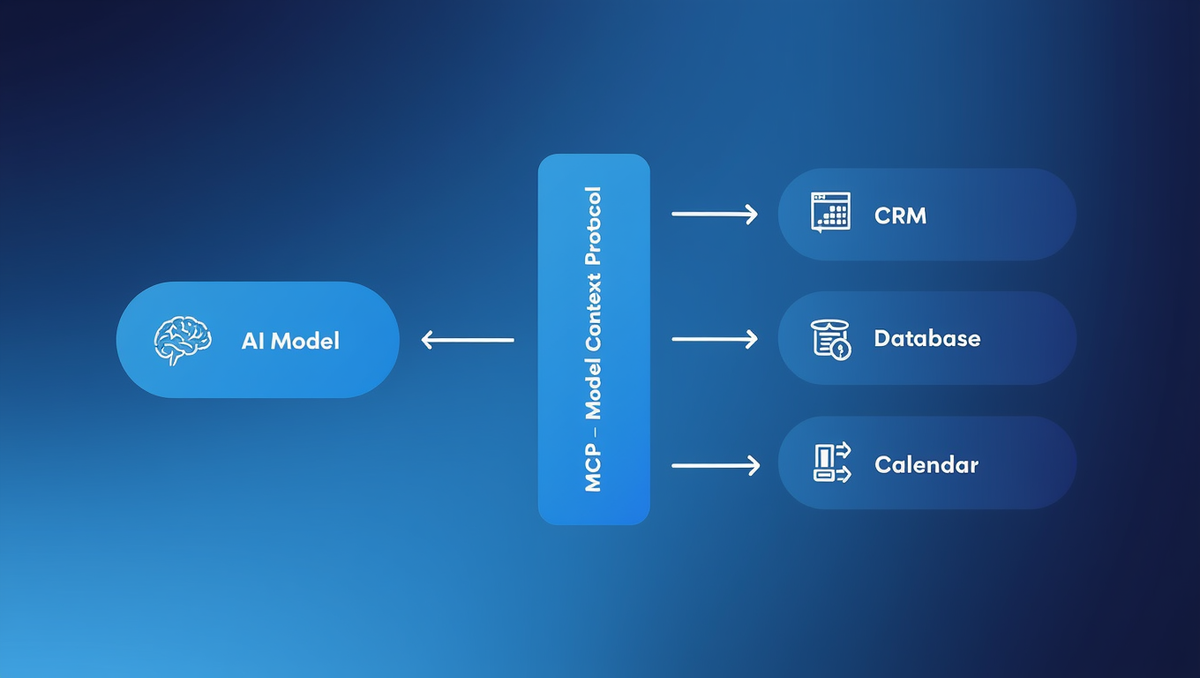
Model Context Protocol (MCP) is an open standard — originally developed by Anthropic — that defines how AI models connect to external data sources and tools. Think of it as a universal plug socket for AI.
Before MCP, getting an AI to pull data from your business systems was a messy, custom-coded affair. Each integration was built from scratch. If you wanted your AI to read from your CRM, check your inventory system, and then draft an email — those were three separate technical problems.
MCP solves this by creating a standard way for AI models to request and receive context from any connected source. A developer builds an "MCP server" for a tool (say, your Salesforce CRM), and then any MCP-compatible AI model can talk to it — without rebuilding the integration each time.
The analogy that helps most people: Think of MCP like USB-C. Before USB-C, every device had its own charger and cable. USB-C didn't change how chargers work — it standardised the connection so any device could plug into any power source. MCP does the same for AI and data.
The protocol covers three things:
- Resources — what data the AI can read (files, databases, records)
- Tools — what actions the AI can take (send an email, update a record)
- Prompts — pre-built instruction templates for specific tasks
This standardisation is why MCP AI integration is becoming a foundational piece of modern AI architecture — not a nice-to-have.
Why MCP Matters for Small and Medium Businesses
Most SMBs use a patchwork of tools — a CRM here, an accounting platform there, project management software somewhere else. Getting AI to work across all of those systems has historically required serious development budgets. That's kept enterprise-level AI out of reach for smaller businesses.
MCP changes the economics of this problem.
Because the protocol is open and standardised, the ecosystem of pre-built MCP connectors is growing fast. Tools like Notion, GitHub, Google Drive, Slack, and dozens of others already have MCP servers available. That means your AI can be connected to your actual business data in a fraction of the time it used to take.
For an SMB owner, this translates to concrete outcomes:
- AI that knows your business: Instead of generic answers, your AI assistant can pull from your actual client data, pricing sheets, or internal policies before responding.
- Faster automation: AI agents can take actions inside your tools — booking appointments, updating records, triggering workflows — not just generate text.
- Lower integration costs: Standardised connections reduce custom development time, which means lower project costs and faster deployment.
One of our clients — a professional services firm — used to spend 15 hours a week manually compiling client reports from four different systems. Once their AI stack was connected via MCP-style integrations, that dropped to under 2 hours. The AI pulled the data, formatted the reports, and flagged anomalies. The team just reviewed and sent.
That's the real-world impact of MCP for SMBs: not just smarter AI, but AI that actually works inside your business.
How MCP Works: A Simple Breakdown
You don't need to understand the technical spec to benefit from MCP — but a basic mental model helps you ask better questions when you're working with an AI development partner.
Here's how a typical MCP interaction works:
1. The AI model receives a user request. Say a salesperson asks their AI assistant: "What's the status of the Henderson account, and do we have any open invoices?"
2. The AI identifies what it needs. To answer this, it needs data from the CRM and the accounting system.
3. The AI sends requests to the relevant MCP servers. Each system has its own MCP server — the CRM server retrieves the account status, the accounting server checks for open invoices.
4. The MCP servers return context. The data comes back in a standardised format the AI can read and reason over.
5. The AI composes a response. "The Henderson account is active, last contacted 3 days ago. There are two open invoices totalling £4,200, both overdue by 15 days."
This entire process happens in seconds. No tab-switching. No manual lookups. No copy-pasting between systems.
The key point: the AI doesn't store your data permanently. It retrieves what it needs, when it needs it, in the moment. This matters for businesses with GDPR or data privacy obligations — including those in the EU, which covers Codynex clients in Dublin and beyond.
MCP vs. Traditional API Integrations
If your business already has some integrations set up — say, your CRM talks to your email platform via an API — you might wonder how MCP is different.
The core difference is who does the reasoning.
Traditional API integrations are rule-based. You define: if X happens in system A, do Y in system B. It's powerful but rigid. Adding a new condition or a new system means more custom code.
MCP integrations are model-driven. The AI decides what it needs, requests it in real time, and adapts based on what it gets back. It's not following a fixed script — it's reasoning through a task.
For SMBs, this means MCP isn't replacing your existing integrations — it's adding a layer of intelligence on top. Your Zapier automations still run. Your CRM sync still works. MCP lets your AI reason across all of it, rather than just trigger predefined actions.
Real-World Use Cases for SMBs
Let's ground this in the kinds of problems SMB owners actually face.
Customer Support AI That Knows Your Products
A retail SMB connected their AI support agent to their product catalogue, order management system, and returns policy via MCP. Instead of scripted chatbot responses, the AI could answer questions like "Can I return the jacket I bought last month?" with a specific, accurate answer — pulling the customer's order history and checking it against the current returns policy in real time. Support ticket volume dropped by 40%.
Sales Intelligence for Faster Follow-Ups
A B2B services company gave their sales team an AI assistant connected to their CRM, email, and LinkedIn activity via MCP servers. Before each sales call, the AI prepared a two-minute brief: last contact, open proposals, any news about the prospect's company. Reps spent less time on prep and more time on the call. Close rates improved within a quarter.
Operations and Reporting Automation
A logistics SMB connected their AI to their inventory system, supplier database, and Slack. Every morning, the AI sent a plain-English briefing: which stock was running low, which supplier orders were delayed, and which warehouse had capacity. No dashboard required. The ops manager just read the message and made decisions.
HR and Onboarding
An SMB with 60 employees used MCP to connect their HR system, document library, and onboarding checklist tool. New hires could ask the AI any question — "What's the process for booking annual leave?" or "Where do I find the IT security policy?" — and get a specific, accurate answer from the actual company documents, not a generic response.
These aren't hypothetical. They're the types of systems Codynex has built for clients across professional services, retail, logistics, and tech sectors.
How Codynex Helps SMBs Build MCP-Ready AI Systems
Understanding Model Context Protocol is one thing. Building an AI stack that actually uses it well is another.
At Codynex, we specialise in building production-ready AI systems for SMBs — including AI agents, custom ML models, and MCP-enabled integrations that connect your AI to the business data it needs to be genuinely useful.
Here's what that looks like in practice:
AI Agent Development: We build AI agents that don't just answer questions — they take actions. Connected via MCP to your CRM, helpdesk, calendar, or ERP, these agents can update records, draft and send communications, and escalate issues without manual input.
Custom Integration Architecture: Not every SMB is using off-the-shelf tools. If you're running custom databases or proprietary systems, we build the MCP servers needed to connect them to your AI stack — securely and in compliance with GDPR standards.
Rapid MVP Development: If you want to test an AI use case before committing to a full build, we can deliver a working prototype in weeks, not months. Clients typically start seeing ROI within 60–90 days.
Ongoing Optimisation: AI systems aren't set-and-forget. We monitor, retrain, and improve models based on real usage data — so your AI gets smarter as your business grows.
Our clients have seen results including 60% reductions in manual processing time, faster customer response rates, and operational savings that justify the investment many times over. With over 100 projects delivered and a 98% client satisfaction rate, we've built the kind of track record that lets SMBs trust us with systems that matter.
Pricing starts from $5K–$15K, making enterprise-grade AI accessible without an enterprise-sized budget.
Ready to see what an MCP-ready AI stack could do for your business? Book a free consultation at codynex.com
Conclusion
Model Context Protocol is not just another tech buzzword. It's the infrastructure layer that makes AI genuinely useful inside real businesses — connecting your models to the data and tools they need to do meaningful work.
For SMBs, the opportunity is clear: companies that build MCP-ready AI stacks now will operate faster, smarter, and leaner than competitors still doing things manually. And with the right development partner, the barrier to entry is lower than most people assume.
The businesses that get the most from AI aren't the biggest ones. They're the ones that move first and build thoughtfully.
If you're ready to explore what MCP AI integration could look like for your business, book a free consultation at codynex.com. No jargon, no pressure — just a practical conversation about what's possible.
Comments ()