
No‑Code Automation Tools Every Small Business Should Know
Discover essential no-code automation tools for small businesses. Learn how SMBs can streamline workflows, save time on invoicing, scheduling, and marketing without hiring a developer.

Running a small business means you are the CEO, marketing department, and support rep all rolled into one. While passion for your product fuels you, the endless administrative busy work can quickly lead to burnout.
Enter the age of no-code automation tools. These are user-friendly platforms that allow non-technical business owners to connect their favorite apps and automate repetitive tasks without writing a single line of code.
If you can point, click, and drag, you can build powerful "SMB workflow automation" that works 24/7. This allows you to focus on growing your business rather than just running it.
The Hidden Cost of Manual Workflows
Many small shops rely on fragmented systems like sticky notes, spreadsheets, and mental checklists. While this might work when you have five customers, it becomes a major bottleneck as you grow.
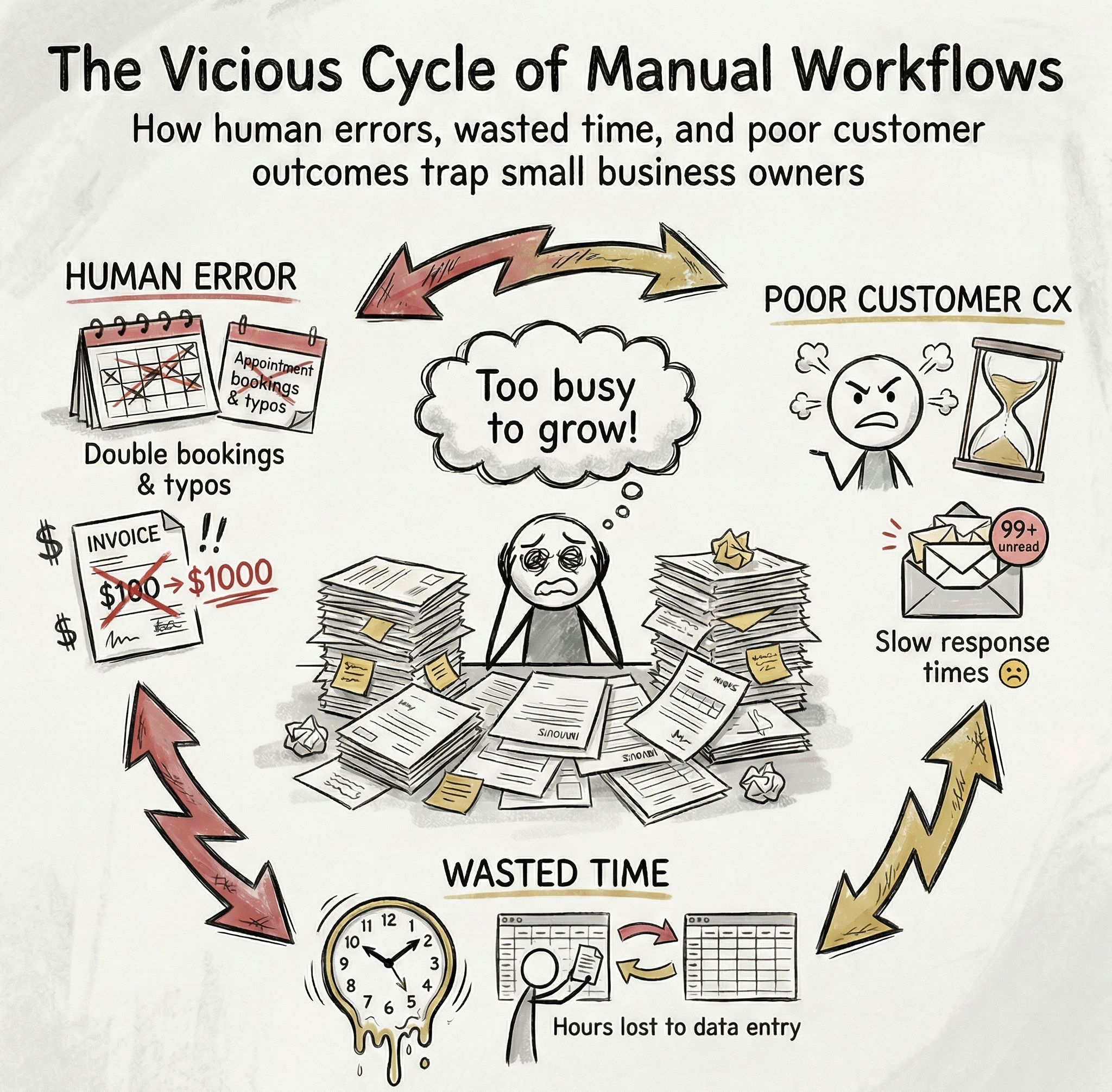
Relying on manual workflows leads to:
- Human Error: Typos in invoices or double-booking appointments.
- Wasted Time: Hours spent copy-pasting data from emails into spreadsheets.
- Poor Customer Experience: Slow response times because you are tied up with admin tasks.
Implementing "easy business automation for shops" isn't about replacing the human touch. It is about removing the robotic tasks so you have more time for the human connections that matter.
8 Essential No-Code Automation Tools for SMBs
Here are 8 practical tools designed to solve common small business challenges.
- Zapier (The Connector)
What it does: Zapier acts as digital duct tape. It connects over 5,000 web apps, allowing them to talk to each other and trigger actions automatically.
Why it’s useful: It eliminates double data entry. If you constantly move information from App A to App B manually, Zapier can do it for you instantly.
Real-Life Scenario: A potential customer fills out a form on your website. Zapier automatically adds them to your Google Sheet lead database, pings your team on Slack, and adds the contact to your email marketing list.
- HubSpot CRM (Customer Management)
What it does: A Customer Relationship Management (CRM) tool that tracks every interaction you have with leads and customers.
Why it’s useful: "Small business automation" relies on nurturing relationships. HubSpot ensures no lead falls through the cracks by centralizing data.
Real-Life Scenario: You meet a client and enter their email into HubSpot. You assign them a "New Contact Sequence." Over the next two weeks, they receive three helpful, pre-written emails introducing your services while you focus on other work.
- Calendly (Scheduling)
What it does: An automated scheduling tool that eliminates back-and-forth emails to find a meeting time.
Why it’s useful: For service-based SMBs, scheduling is a massive time sink. Calendly lets clients book time directly on your calendar based on your real-time availability.
Real-Life Scenario: Instead of playing phone tag, you send a client a Calendly link. They choose a slot for a consultation and pay a deposit. The appointment appears on your calendar instantly.
- QuickBooks Online (Finances)
What it does: Cloud-based accounting software that manages bookkeeping, invoicing, and expenses.
Why it’s useful: It automates the invoicing process and chases down late payments so you don't have to have awkward conversations.
Real-Life Scenario: You finish a project and generate an invoice. If it isn't paid by the due date, QuickBooks automatically sends a polite reminder email to the client three days later.
- Mailchimp (Email Marketing)
What it does: A platform to design, send, and track professional newsletters and marketing campaigns.
Why it’s useful: It helps you stay top-of-mind with your customer base and drive repeat sales through automated messaging.
Real-Life Scenario: A customer buys a birthday cake from your bakery. Mailchimp adds them to a segment and automatically sends a 10% discount coupon 11 months later for their next birthday.
- Airtable (Organization)
What it does: It looks like a spreadsheet but acts like a powerful database. It is incredibly flexible for tracking inventory or projects.
Why it’s useful: Traditional spreadsheets break easily. Airtable allows you to organize complex information visually and link data together.
Real-Life Scenario: You use Airtable to track inventory. When a specific item drops below five units, it automatically sends you a Slack notification saying, "Reorder Alert: Blue Scarves are low."
- Trello (Project Management)
What it does: A visual collaboration tool using boards and cards to organize projects.
Why it’s useful: It keeps small teams aligned on what needs to get done without endless status meetings.
Real-Life Scenario: When an order is ready, your team drags a card from "In Progress" to "Ready" on the Trello board. Trello automatically emails the customer to let them know their item is done.
- Slack (Communication Hub)
What it does: A messaging platform for teams that replaces internal emails and centralizes notifications.
Why it’s useful: It acts as the "hub" for your other automation tools.
Real-Life Scenario: Rather than checking five different dashboards, your "#activity-feed" channel alerts you to new payments, bookings, and reviews in one place.
Moving from No-Code to Smart Code
Embracing no-code automation tools allows you to buy back your most valuable resource: time.
However, basic automation is just the beginning. As your business scales, you may need solutions that don't just repeat tasks, but actually think through them. This is where the next generation of AI tools for small businesses comes in.
The tools mentioned above are great for automating individual tasks like emails, scheduling, or invoicing. Codynex goes a step further by connecting these tools and automating complete business workflows using AI, so your systems work together instead of in silos.



Comments ()